
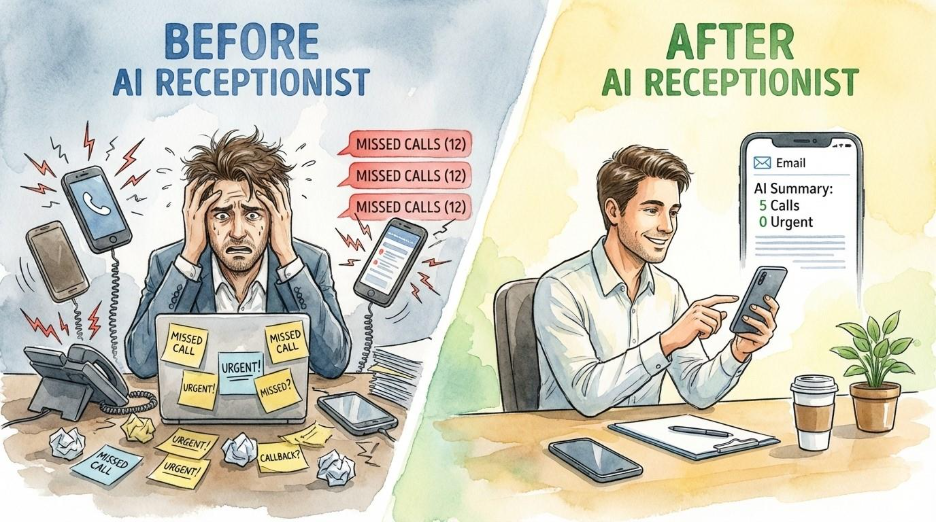
You're knee-deep into your work when your phone rings. It buzzes again while you're with a customer, again on the drive to your next meeting, and again while you're updating an invoice. By the end of the day, most of the inquiring customers have already scheduled next steps with competitors who answered.
This scenario plays out thousands of times every day for small businesses. You can't answer every call. You can't afford to hire a full-time receptionist. And those missed calls? They're missed opportunities and missed revenue.
But what if there were another option?
I recently built an AI voice receptionist for a local asphalt paving company. Not a chatbot. Not an automated phone tree where callers press 1 for this and 2 for that. An actual conversational voice agent that picks up the phone, talks with customers in natural language, gathers the information the business needs, and sends a detailed summary to the owner's inbox, complete with a transcript and audio recording.
This isn't science fiction. The system is live and handling real calls right now. And while I'm not going to pretend this was plug-and-play simple, it was absolutely achievable for someone without a developer background. If you're willing to invest some time learning, you can build one, too.
1: What happens when someone calls
Let me put you in the caller's shoes so you can better understand what this technology operates:
A customer dials the business number. Instead of ringing endlessly or hitting a generic voicemail, an AI voice answers. It sounds natural, friendly, professional, and human-like. The voice introduces itself as the company's receptionist and asks how it can help.
The caller explains they need their driveway repaved. The AI asks follow-up questions: What's the address? Roughly how large is the area? When would be a good time for someone from the company to come take a look?
The conversation flows naturally. If the caller goes off script, asking about pricing or whether the company handles commercial work, the AI adapts. It's not following a rigid decision tree. It's having a conversation.
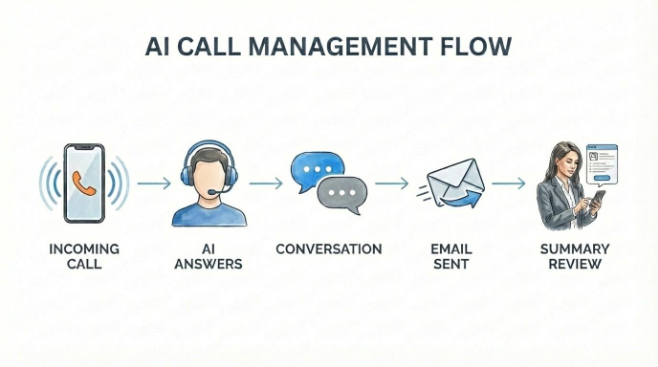
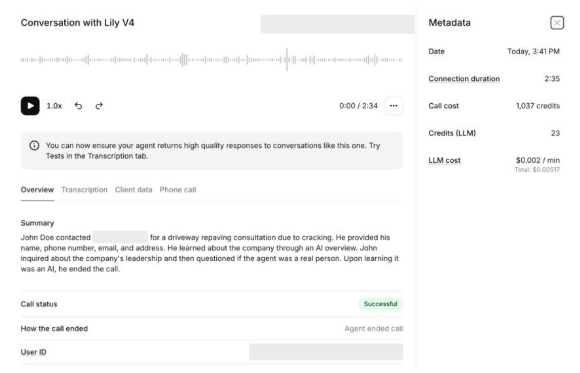
When the call ends, here's what the business owner receives via email within seconds:
- The caller's phone number, along with the date and time of the call, are automatically captured.
- The caller's name, their address, what type of job they're requesting, and a plain-English summary of the call are extracted from the conversation.
- A full transcript of the conversation, a link to the audio recording, and call statistics are also included.
The business owner can review the summary on their phone between meetings or jobs, and then call the customer back at their convenience with complete context about what was discussed. Or the information can be emailed directly to the appropriate salesperson, ready for follow-up. Meanwhile, the customer feels accomplished: They've successfully contacted one of the three companies on their list, and someone will be getting back to them.
2: The technology behind it (simply explained)
If you've read my previous article on vibe coding, you'll remember the five essential components of any application: frontend, backend, data storage, infrastructure, and version control. An AI voice receptionist has its own version of these building blocks, but there are only four of them, and they look a bit different.
The Phone Number: Twilio
Your AI receptionist needs a phone number that can do more than just ring. Standard phone lines from carriers like Verizon won't work because they don't pass along the digital information required for AI processing. Twilio provides special SIP-enabled numbers designed specifically for this kind of data transfer. The cost? About a dollar per month for the number itself, plus a few cents per minute for calls.
The Voice and Brain: Eleven Labs
This is where the magic happens. Eleven Labs is a voice AI platform that handles both the voice itself (how your AI sounds) and its conversational ability (how it thinks and responds). You can choose from hundreds of pre-made voices or create your own. You can adjust speaking speed, set the personality and tone, and define exactly what the agent should and shouldn't say. One way to think of Eleven Labs is as both the voice and the mind of your receptionist.
The Workflow Automation: N8N
When a call ends, something needs to happen with all that information. N8N is a workflow automation tool that acts as the "traffic controller." It receives the call data from Eleven Labs, sends the transcript to an AI for summarization, formats everything nicely, and fires off the email to the business owner. All of this happens automatically within seconds of a call ending.
The Intelligence: A Large Language Model
Within the N8N workflow, the actual summarization (turning a five-minute conversation into a clear, actionable email) is handled by a large language model like ChatGPT or Claude. The LLM reads the transcript, identifies the key information, and generates the summary that lands in the owner's inbox.
3: Customization goes deeper than you'd think
One of the most impressive aspects of Eleven Labs is how much control you have over your AI receptionist's behavior. Here are just a few of the available options:
- Voice and personality. Beyond selecting a voice, you can make your agent more friendly, more professional, speak and respond faster or slower, and more. You can adjust how it handles pauses, how it responds to interruptions, and how it recovers when it doesn't understand something.
- Knowledge and boundaries. You define what your agent knows and doesn't know. You can program specific responses to common questions like business hours, service areas, and general pricing guidance. You can also set hard boundaries on what the agent can't discuss, preventing it from making promises you can't keep.
Call routing and escalation. If a caller specifically asks to speak with a human, your agent can forward the call. You can set up triggers for certain situations (emergencies, existing customers, particular types of requests) that route differently than standard calls. The AI determines where to send each call based on the conversational context and not just presses of a button.
This isn't a one-size-fits-all answering machine. It's a customizable system that can be tuned to fit your specific business needs.
4: The numbers: What this costs
Let's talk about the comparison that matters most to small business owners: money.
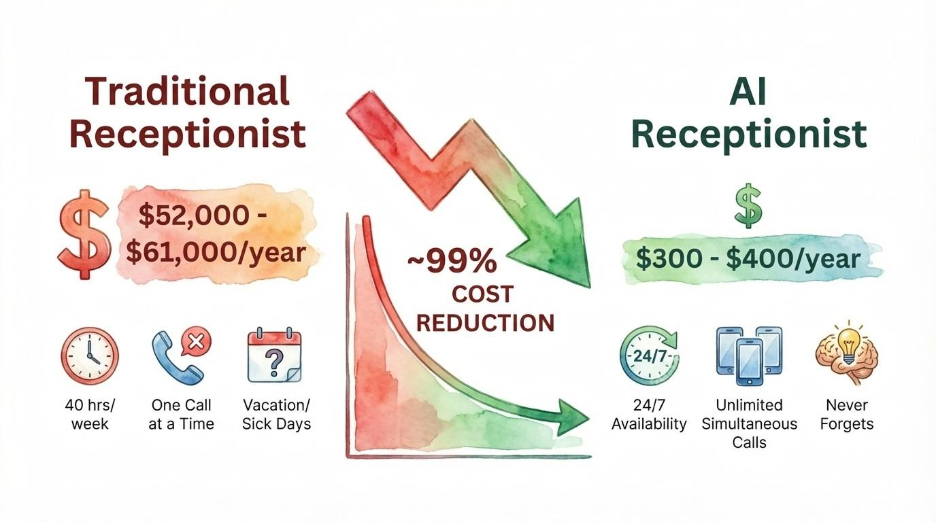
Traditional receptionist costs add up quickly. The average annual salary runs between $36,000 and $42,000 (Bureau of Labor Statistics, Salary.com). But that's just the starting point. Add employer payroll taxes (7.65%), benefits which typically add 30% to total compensation (BLS Employer Costs for Employee Compensation, 2024), and training costs averaging $774 per employee annually (Training Industry Report 2024). Include equipment and desk space, and the true first-year cost of a full-time receptionist lands between $52,000 and $61,000.
And that investment still doesn't cover 24/7 availability or the missed opportunities you lose outside of business hours.
However, AI voice receptionist costs look dramatically different. Here's what I'm actually paying for the system I built:
The Eleven Labs Creator plan costs $22 per month. In the first full month of operation, I used less than 10% of my included credits. Twilio costs came to approximately $3 per month (about $12.61 total from September through December), including the phone number and all call minutes. The N8N automation runs on a free tier. The LLM processing costs pennies per call.
Total monthly operating cost: roughly $25 to $30. For 24/7 coverage.
Let me make the comparison that addresses the real question you may have: A traditional receptionist costs $50,000+ per year, doesn't work nights or weekends, and can only handle one call at a time. An AI receptionist costs under $400 per year, works every hour of every day, and never misses a detail -- or a call.
[IMAGE RECOMMENDATION: Your analytics screenshot showing 998 total requests with 99.7% success rate]
The real-world performance data backs this up. Over the past three months, this system has handled 138 minutes of actual customer calls with a 99.7% success rate and an average response latency of 9.6 milliseconds. Customers are getting through. Calls are being answered. Information is being captured.
5: What we don't know yet: Being honest about limitations
I believe strongly in presenting technology honestly, and there are real unknowns with AI voice receptionists that deserve acknowledgment.
The disclosure dilemma. Some callers, particularly younger ones, recognize immediately that they're talking to AI. They adjust their communication style, sometimes repeating themselves or speaking more deliberately. Others don't seem to notice at all. We've observed more hang-ups when the opening mentions "automated receptionist" versus when it doesn't.
This raises real questions: Do we have an obligation to be honest up-front about the presence of AI? Or should we tell the callers at the end, after they’ve found it to be a smooth process? Should we tell them at all? Do they even care?
The research here is striking: One academic study found that disclosing AI identity before a conversation reduced purchase rates by 79.7% (Luo et al., Marketing Science). Customers perceive bots as less knowledgeable and less empathetic than a human, even when the AI performs equally well.
That said, disclosure requirements are evolving rapidly. Colorado's SB 24-205 -- , which was passed in 2024 and is set to take effect on June 30, establishes specific AI disclosure requirements that businesses need to understand. Utah also passed similar legislation in 2024. California's Bot Law requires disclosure if a bot is used to "knowingly deceive" for commercial transactions. Fines can reach $2,500 per violation.
For businesses deploying AI voice agents, understanding these requirements isn't optional. The verdict is still out on optimal disclosure timing and wording, but compliance must come first.
Customer acceptance varies. The general statistics are encouraging: 51% of consumers prefer bots for immediate service (Zendesk), and 59% rate AI interactions 8/10 or higher (Uberall, 2024). But your specific market may differ. For example, older individuals may respond differently and want a more traditional customer service process than the general population. Long-term acceptance in regional markets like Colorado remains to be seen.
The technology will change. The specific tools I've described (Eleven Labs, Twilio, N8N) may evolve or be replaced by better options. The skills you develop will transfer, but the exact platforms may not last.
6: Safety and security deserve your attention
Voice data is biometric data, as unique as a fingerprint. Take security seriously.
Voice cloning attacks increased 442% in 2024 (CloudTalk). Voice recordings can reveal emotional state, health indicators, identity, and background voices. The average cost of an AI-related data breach reached $4.9 million last year (IBM Cost of a Data Breach Report, 2024).
If you're handling customer voice data, know your regulatory obligations:
GDPR (if you have European customers) treats voice data as "special category personal data" requiring explicit consent. CCPA (California residents) regulates voice data collection. HIPAA (if you touch anything health-related) imposes strict standards. TCPA requires transparency when using artificial or prerecorded voice.
Best practices for your setup: Use end-to-end encryption. Don't keep recordings longer than necessary. Verify your providers have SOC 2 and ISO 27001 certifications. Document your security measures.
This isn't meant to be a comprehensive guide to data security and compliance. But these considerations are too important to skip over entirely. Although the established platforms generally handle much of this infrastructure for you, you should understand what you're working with and consult appropriate professionals for your specific situation.
7: The reality of ongoing optimization
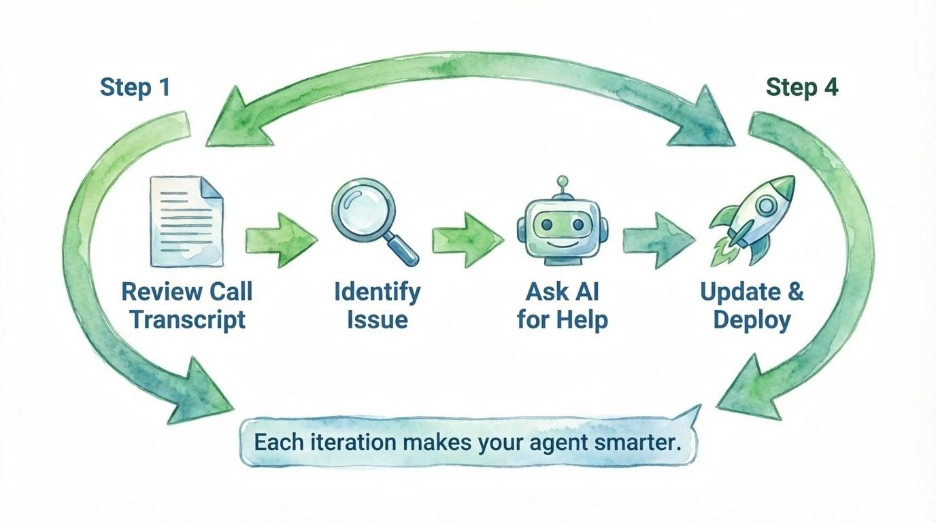
Here's something I wish more AI content acknowledged: Launching is not the finish line. It's the starting line.
After three months of operation, I'm still refining the system. Not because it's broken, but because real-world calls reveal situations no amount of testing could anticipate.
No matter how many beta tests you run, no matter how many friends and family you have call in, customers will ask questions you never imagined. Accents, background noise, unusual requests, misheard words: These things happen all the time. Your AI will occasionally misunderstand. A caller will get frustrated. A summary will miss a key detail.
The good news is that iteration is incredibly easy.
When something goes wrong, I review the transcript. I paste it into Claude or ChatGPT with a simple question: "How should I update my instructions to handle this better?" I get suggestions, update the agent's instructions, and deploy the fix immediately. Each iteration makes the system smarter.
This is actually one of the most empowering aspects of AI tools. You're building institutional knowledge into a system that never forgets and never has a bad day. Unlike training a human employee, where knowledge can walk out the door when they leave, every improvement you make is permanent.
8: How long this takes to build
Let me be transparent about the time investment.
I first started exploring Eleven Labs for other purposes in mid-2025, spending maybe an hour familiarizing myself with the platform. I began seriously building this voice agent on August 20th. The phone number went live on November 20th, exactly three months later.
The Eleven Labs voice agent setup was straightforward but required approximately five hours of tweaking to get the voice, personality, and responses where I wanted them. The complete system (integrating Twilio, building the N8N workflow, connecting the LLM for summarization) took about 20 hours of total research, build, and testing time.
Since launching, I've spent progressively less time each week on refinements. At this point, it's maintenance and occasional improvements, not active building.
For context: this was my third automation project. I come from a non-developer background. I'm simply someone passionate about business systems and how they work. Now, with one voice agent under my belt, I'm confident I could build a second one for a different business in under 10 hours.
That's not because I'm particularly technical. It's because the tools have become that accessible, and because experience compounds quickly.
9: Where to learn all of this
I want to share the resources that helped me most, because finding good education in this space can be overwhelming.
Nate Herk specializes in N8N automation with deep expertise. His YouTube channel offers excellent step-by-step tutorials for free. For those wanting structured education, his AI Automation Society Plus community on Skool ($94/month) includes comprehensive courses, weekly live Q&As, over 100 N8N templates, tech support, and even job opportunities. He also maintains a free Skool community for beginners. I found the paid community worthwhile for the direct access to expertise and structured, thorough education, but you can absolutely start learning for free.
Ben AI and his resources have also proven very useful throughout this process, particularly for understanding the broader landscape of building automation solutions within structured business frameworks.
Make no mistake, though: Large language models like ChatGPT, Claude, and Gemini will be your best friends throughout this process. When you hit a roadblock, go ahead and take a screenshot, describe what you're seeing, and ask for help. These AI assistants can walk you through step-by-step troubleshooting, explain error messages, and help you research solutions in ways that would have taken hours of forum digging just a few years ago. I regularly paste screenshots with error messages on them and watch them work their magic. The response is usually exactly what I needed to move forward.
The key insight here: You don't need to master every tool before starting. Pick one platform, watch some tutorials, and start building something small. The learning accelerates dramatically once you're working on a real project, especially when you have an AI assistant helping you navigate the inevitable hiccups.
10: The bigger picture: Why this matters for your business
The voice AI market is projected to reach $47.5 billion by 2034, and 80% of businesses plan to use AI-driven voice technology by this year. But the real story isn't about market size. It's about what this technology makes possible for businesses that couldn't previously afford such technologies.
This is an in-your-face example of how AI and automation can improve your internal business operations, especially if times are financially tough or if a $50,000 receptionist simply isn't in the budget. The technology that was once reserved for large companies with IT departments is now accessible to anyone willing to spend a few weekends learning.
Closing Thoughts
Every call your AI receptionist handles represents a problem solved: a customer served, information captured, an opportunity preserved.
You don't need a developer background. You don't need a massive budget. You don't need to understand every line of code. What you need is willingness to learn, patience with the process, and a clear picture of the problem you're trying to solve.
The AI voice receptionist I built costs roughly $25 to $30 per month to operate and provides something a $50,000 employee couldn't: full 24/7 coverage with perfect memory and instant documentation of every conversation.
Is it perfect? No. Does it require ongoing refinement? Yes. Will the specific tools evolve? Absolutely.
But the core capability, namely, giving your business a professional, responsive voice that never sleeps, is available right now. Today. For less than your monthly coffee budget.
In future articles in this AI 101 series, we'll continue exploring how these technologies are reshaping the way small businesses operate. Until then, consider what phone coverage actually costs your business, not just in dollars, but in missed opportunities.
What problem have you been wanting to solve?